10 Free Photo Effects: Cinematic, Vintage, Neon
Apply 10 one-click photo effects online — cinematic, vintage, neon, dark moody, film noir — then tune grain, glow and vignette. Free, private, no upload.
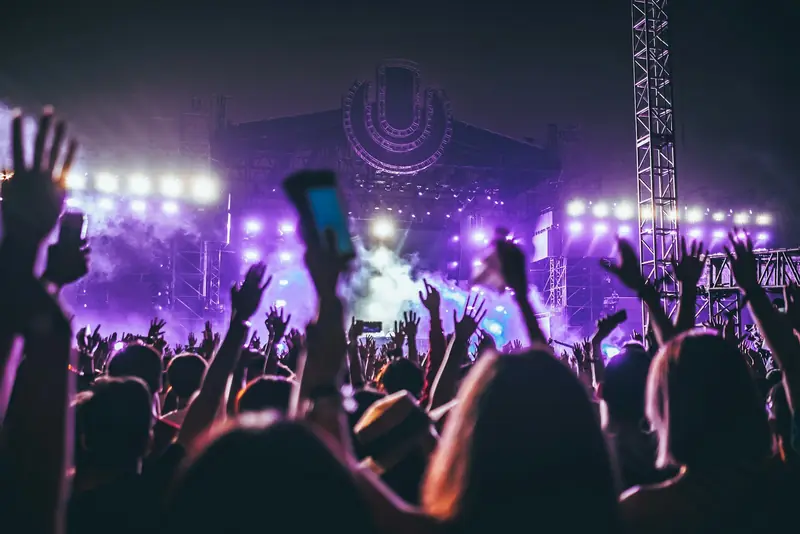
Your photo is good. But it could be great.
A photo taken on a cloudy day needs a cinematic vibe — darkened, color-graded, vignette at the edges. A nighttime shot needs moody vibes — purple glow, darkened edges, film grain. A casual selfie needs neon energy — bright, saturated, glowing edges.
Professional photographers use Lightroom presets or Photoshop to achieve these looks. They cost money. Take time to learn. EditMyStuff gives you one-click presets that transform photos into polished, professional images. 10 presets. Unlimited customization. Free. Online. No upload.
What Are Photo Effects Presets?
A preset is a saved combination of adjustments: brightness, contrast, saturation, color grading, vignette, bloom, grain, blur. One click applies all adjustments at once.
Think of it like Instagram filters, but:
- ✅ More powerful (true color grading, not simple filters)
- ✅ Fully customizable (adjust each effect)
- ✅ Non-destructive (undo anytime)
- ✅ Batch-able (apply the same style to every photo you've opened)
- ✅ Private (no upload, no watermark)
The 10 Presets
Cinematic Moody and movie-like. Navy-tinted shadows, warm highlights, extra contrast, slightly muted colour and a vignette. Perfect for portraits, drama.
Neon Bright, energetic, vibrant. Heavily saturated colors, strong bloom, high contrast and a faint magenta wash. For nightlife, urban, edgy vibes.
Vintage Warm, nostalgic, faded. Warm color cast, vignette, film grain, slight desaturation. 70s/80s photo aesthetic.
Dark Moody Mysterious, atmospheric. Darkened, purple-tinted shadows, a cool cast, heavy vignette and a little bloom.
Sunny Bright, cheerful, summery. Boosted brightness, warm yellow cast, soft bloom. For outdoor, beach, happy vibes.
Cool Blue Cold, crisp, modern. Blue color cast, navy shadows, high contrast and no vignette. For winter, tech, corporate.
Film Noir Classic, dramatic, B&W. Black & white, high contrast, vignette, grain. Timeless, sophisticated.
Retro 80s Bold, fun, nostalgic. Saturated, a cyan wash with magenta shadows, and grain. Synthwave aesthetic.
Dreamy Soft, ethereal, romantic. A touch of blur, strong bloom, a pink soft-light wash and a little extra brightness. Fairy-tale, romantic vibes.
Night Dark, atmospheric, nighttime. Darkened, blue cast, navy shadows and a heavy vignette. For night shots, mood.
How Photo Effects Work
Each preset adjusts:
- Color Grading: Add color tint to shadows and highlights
- Temperature: Warm (yellow/orange) ↔ Cool (blue/cyan)
- Vignette: Darken edges, keep center bright
- Grain: Film grain, adds texture
- Bloom: Bright areas glow
- Overlay: Color wash over entire photo
- Saturation: Boost or mute colors
All effects combine to create a cohesive look.
How to Use Photo Effects: Step-by-Step
Step 1: Open EditMyStuff Navigate to editmystuff.in/image-editor.
Step 2: Upload Photo Drag and drop image or click to browse.
Step 3: Open Effects & styles Click Effects & styles (the sparkle icon) in the toolbar. The effects panel opens.
Step 4: Choose Preset See grid of 10 preset styles. Click one:
- "Cinematic" for moody, professional look
- "Neon" for bright, energetic vibe
- "Vintage" for nostalgic, warm feel
- etc.
Step 5: Live Preview Photo updates instantly. See the effect applied.
Step 6: Customize (Optional) Want to adjust? Open individual effect sliders:
- Vignette: increase/decrease edge darkening
- Bloom: make bright areas glow more or less
- Grain: add/remove film texture
- Overlay: adjust color wash
- Color grading: tweak shadows/highlights/temp
Fine-tune until perfect.
Step 7: Apply & Export Click Apply changes. Pick a format (PNG, JPG, WebP) under Export. Click Download image.
The entire process takes 30 seconds.
Customization: Make It Yours
Presets are starting points. Every photo is different. Customize:
Vignette:
- One strength slider: none → dramatic dark edges
Bloom:
- Strength slider: none → bright areas glowing strongly
Grain:
- Intensity slider: barely visible → heavy film texture
Color Overlay:
- Color picker: any color
- Blend mode: multiply (darken), screen (lighten), overlay, soft light
- Opacity: transparent → opaque
Color Grading:
- Shadow color: add color cast to dark areas
- Highlight color: add color cast to bright areas
- Temperature: warm yellow ↔ cool blue
- Tint: cyan ↔ magenta
Example: "Dark Moody" preset applied, then adjust:
- Increase the vignette → more dramatic edges
- Change the shadow tint to a deeper purple
- Add grain for texture
- Boost temperature slightly for warmth
Result: custom mood that's 100% yours.
Use Cases
Instagram Post: Apply "Neon" or "Retro 80s" preset → bright, energetic, shareable.
Portrait: Apply "Cinematic" preset → professional, moody, flattering.
Landscape: Apply "Sunny" preset → warm, inviting, cheerful.
Night Photography: Apply "Night" or "Dark Moody" preset → atmospheric, mysterious.
Wedding/Events: Apply "Dreamy" or "Cinematic" preset → romantic, polished.
Brand/Business: Apply "Cool Blue" or "Film Noir" preset → professional, sophisticated.
Batch Social Media:
- Take 20 photos
- Upload all
- Apply "Neon" preset to all 20
- Download ZIP
- Post consistently with cohesive aesthetic
Batch Apply Effects
Need to process 50 photos with the same look?
- Upload batch
- Select preset
- Customize (if needed)
- Click Apply style to all
- Download ZIP
All 50 photos get the same effects. No one-by-one processing. Done in seconds.
Common Questions
Q: Can I undo effects? A: Yes. Ctrl/Cmd+Z. All edits are non-destructive until export.
Q: Can I combine multiple presets? A: No. Picking a preset replaces the current adjustments and effects with that preset's. Pick the closest one, then fine-tune the individual sliders on top.
Q: Do presets work on mobile? A: Yes. Full touch support. Tap preset, see live preview, tap export.
Q: Can I save custom presets? A: Future feature. Currently, 10 built-in presets + full customization covers most needs.
Q: Do effects work on filtered photos? A: Effects sit on top of crops, text and redactions. One catch: a preset resets the brightness, contrast, saturation and other basic adjustments, so apply the preset first and make those tweaks after.
Professional Results, No Software Required
Stop downloading Lightroom presets or learning Photoshop. EditMyStuff gives you professional photo effects online, free, instant.
Your photos deserve to shine.
Open EditMyStuff now and transform your photos with one click.
Or learn how to add text to images to complete your design.
Apply cinematic effects & one-click presets, free.
Everything runs in your browser. Nothing leaves your device.
Want captions too? See how to add text on photos — read the guide.